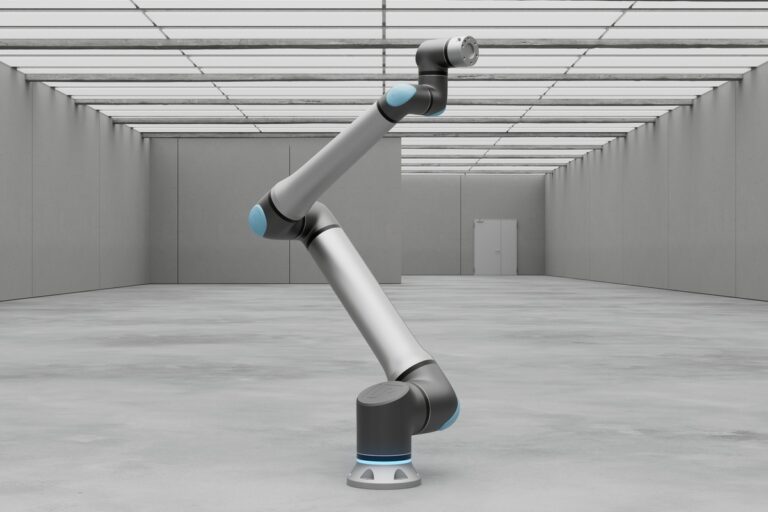
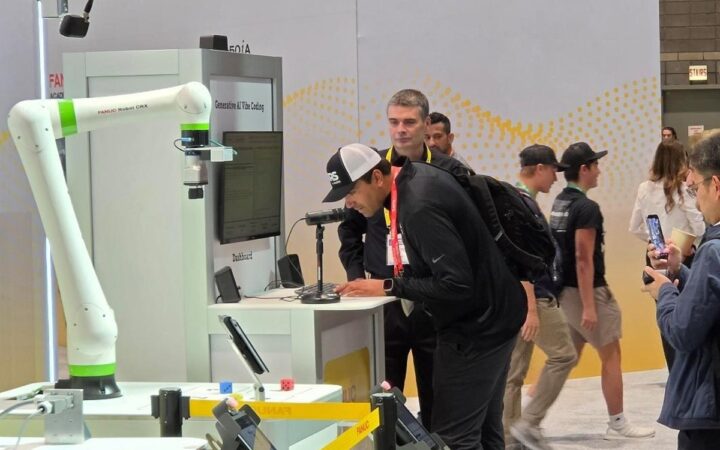
Collaborative robots can automate repeatable tasks when tooling, human access and production requirements are designed together. Photo: Universal Robots
Learn how collaborative robots work, where cobots fit, and how to evaluate safety, tooling, performance and costs before deploying a complete workstation.
A collaborative robot, or cobot, is an industrial robot intended for applications in which people and robots can work in a shared space under defined safety conditions. Its appeal is practical: a manufacturer can automate a repetitive step while keeping people involved in loading, inspection, changeovers or decisions that are harder to automate.
Choosing a cobot is still an engineering decision. The arm must suit the load and motion, the tooling must handle real parts, and the completed application must deliver useful output with appropriate safeguards. This guide builds on our automation guide to explain how to evaluate that complete system, from the first task study to production acceptance.
Key Takeaways
A cobot enables a collaborative application, but the tool, workpiece, surrounding equipment and operating procedure determine whether people can safely share its workspace.
Select a robot using the complete load, usable reach, required quality and measured production cycle, then test those requirements with representative parts and the intended safeguards.
A successful deployment has a clear owner, documented recovery procedures and a business case based on accepted output and usable labor capacity rather than the arm’s price or fastest demonstration.
What Is a Collaborative Robot?
In everyday industry language, “cobot” usually refers to a compact articulated robot arm with features that support work near people, such as monitored motion, force sensing and accessible programming. The broader concept is human-robot collaboration: how the person, machine and task interact.
That distinction matters. A person might load a fixture while the robot is stopped, inspect a component in a neighboring station, or share a working area with a robot whose motion is limited for that particular task. These arrangements create different production requirements and different exposure to hazards.
OSHA’s technical manual describes collaborative industrial robot applications in terms of direct interaction with workers. It also treats the robot system as more than its arm: controls, end-effectors, sensors and associated equipment belong to the application.
A cobot is therefore not a humanoid, a general-purpose employee or necessarily an AI system. It can execute a conventional programmed sequence at a fixed workstation. Our robot definition explains the underlying relationship between sensing, control and physical action.
Cobots and Conventional Industrial Robots
Cobots and conventional industrial arms overlap in many tasks. Both can move parts, operate tools and communicate with other machinery. The useful comparison is between completed workstations that satisfy the same production requirement, including access, maintenance and safeguarding.
Question
Cobot application
Conventional robot cell
Human access
Often designed around regular operator interaction
Often separates automatic motion from routine access
Throughput
Must be measured with actual interaction and safety settings
Can suit demanding continuous cycles behind safeguards
Changeovers
May offer convenient teaching and reusable task recipes
Can also be flexible, with suitable tooling and software
Project cost
Includes integration, tools, validation and training
Includes the same system costs and its cell infrastructure
A label does not settle the choice. A small, fenced industrial arm may be the better solution for a rapid, repetitive operation. A cobot may be attractive where operators need frequent access or product changes are common. Ask suppliers to demonstrate the required workflow rather than compare isolated headline specifications.
How a Cobot Workstation Works
Consider a workstation that transfers components from a tray to an inspection fixture. The controller selects a part location, the arm moves its tool into position, and the gripper takes hold. A sensor or other check confirms that the part is present before the arm transfers it. The inspection equipment returns a result, and the system directs the component to the appropriate destination.
The important details lie between those actions. How does the robot know a tray is correctly located? What happens if a component is missing? Can it distinguish a successful grip from an empty closure? Who replaces the tray, and how is access coordinated with motion?
For a first project, make the physical arrangement predictable. A locating fixture or indexed tray can solve a problem that would otherwise require a camera, image processing and additional recovery logic. Add complexity when it solves an observed need.
The workstation also needs a shared understanding of state. “Ready,” “busy,” “part accepted” and “fault” should have clear meanings across the robot, inspection device and operator interface. A machine that moves correctly but acts on the wrong signal can still produce scrap or interrupt production.
Where Collaborative Robots Fit Best
Useful candidates include machine loading, packaging, screwdriving, dispensing and inspection handling. These are task families, not guarantees of suitability. Two packaging jobs can differ sharply if one handles rigid boxes in a known position and the other handles soft, reflective bags arriving in random orientations.
Machine tending: A cobot loads and unloads a machine while a person manages material supply, quality checks or several workstations. Machine access and signals must be part of the design.
Assembly assistance: The robot handles a repeatable movement or tool operation while a person performs a judgment-intensive step. Parts must arrive in a consistent, usable condition.
Packing and palletizing: The robot transfers goods through a defined pattern. Package variation, stack stability and operator access can matter as much as lifting capacity.
Inspection handling: The arm presents parts to a camera or measuring device. The value comes from reliable positioning and accepted measurements, rather than motion alone.
To shortlist a task, observe several normal production runs and at least one changeover. Record the awkward cases people routinely solve without reporting them: a bent tab, a damp box, a misplaced separator or a fixture that needs cleaning. Those small adjustments can determine whether the application is straightforward or expensive.
Safety Depends on the Complete Application
A collaborative-capable arm does not make every attached process suitable for close human access. A sharp workpiece, hot tool or trapping point can change the application’s risk. Universal Robots’ risk guidance assigns application assessment to the integrator and says additional safeguarding is needed when built-in functions cannot sufficiently reduce the risks.
In practical terms, decide where people need to stand, what they need to touch and when access is necessary. Review normal running, setup, cleaning, fault recovery and maintenance. A workstation should not require an operator to improvise a recovery inside a hazardous area just to keep a shift moving.
Separate the robot’s safety documentation from the completed application’s validation. ISO’s published robot standard, ISO 10218-1:2025, covers the robot itself, while Part 2 addresses industrial robot applications and cells. The integrator should identify the applicable standards and local requirements for the actual installation.
Do not approve a production layout merely because a trade-show demonstration used a similar arm without fencing. Ask for documented assessment and validation of your tool, load, surrounding machinery and intended operation.
Two Different Ways to Manage Human Access
One approach limits the robot’s power and force for the assessed application. Another monitors separation and adjusts or stops motion as a person approaches. These approaches can support different layouts; the choice is part of system design rather than a preference selected after installation.
ABB’s SWIFTI announcement provides a concrete example of separation-based operation: the system combines safety software and a laser scanner to manage human proximity. It illustrates why a collaborative application need not depend on tolerating contact.
For production planning, request a demonstration with the expected human movements. A workstation that performs well while empty may spend much of a shift slowing or stopping if operators repeatedly cross its monitored area. Changing the location of a replenishment point may improve the result more than increasing the arm’s nominal speed.
Payload and Reach: Read Beyond the Headline
Payload includes what the arm carries, not just the saleable product. Universal Robots’ payload documentation says to include the gripper and workpiece and explains that capacity depends on the load’s center-of-gravity offset. Its controller can also adjust acceleration according to configured load properties.
For an illustrative shortlist, a 4 kg component plus 2 kg of tooling creates a 6 kg carried load before any additional wrist-mounted accessories. That arithmetic is only the starting point. A long component held at one end behaves differently from a compact component held near its center. Have the supplier check the complete geometry and motion against the robot’s limits.
Reach also needs a layout check. The tool must approach and leave the part with a usable orientation, clear the fixture, and avoid surrounding equipment. A point inside the nominal reach envelope may still be awkward to access without joint limits or collisions.
Bring dimensioned drawings and representative parts to the evaluation. Ask for a simulation or physical trial that includes the gripper’s open position, cables, machine doors and the highest or lowest placement. These details should be resolved before the robot and mounting hardware are ordered.
The Gripper Often Decides the Outcome
The end-effector is the interface between a repeatable robot and a variable product. A poor grip can undo otherwise accurate motion. The selection should start with the object: its mass, shape, surface, temperature, fragility and acceptable contact areas.
A vacuum tool might suit a flat package, but its suitability depends on the surface and available sealing area. Mechanical fingers may provide a positive hold, but need clearance around the part. A tool changer can broaden the task range while adding weight, connections and another component to maintain.
Robotiq’s gripper specifications distinguish tool weight, payload, material compatibility and energy supply. Treat those as separate requirements when comparing options rather than assuming a compatible mounting flange means a compatible application.
Test normal variation deliberately. Use the least rigid package, the heaviest part and the most difficult approved surface condition. Agree what constitutes a detected failure, what the system does next, and whether the operator can recover without losing track of which parts passed inspection.
Measure the Whole Production Cycle
Robot travel time is only one part of throughput. Include gripping, settling, device signals, inspection, release, replenishment and recovery. Time the complete operation in its intended layout, with the safeguards active.
Suppose an illustrative handling cycle takes 12 seconds of arm motion, 5 seconds for gripping and confirmation, and 7 seconds waiting for an inspection result. The total is 24 seconds, giving a theoretical 150 cycles per hour. That is a ceiling before interruptions, not a production commitment.
If the workstation completes 120 accepted parts per scheduled hour during a representative trial, use that observed result to discuss capacity. Record how much time went into replenishment, rejected parts, stops and recovery. An average without those causes is less useful when deciding what to improve.
Compare the output with the whole line. Automating a step that already waits for a slower downstream process may free an operator’s time without increasing shipments. That can still be worthwhile, but the business case should identify the benefit accurately.
Programming, Vision and AI
Many cobot platforms offer graphical programming or guided teaching. These tools can make a motion sequence easier to build, but they do not specify how a business process should behave. Someone still needs to define acceptable input, output, interruptions and restart conditions.
Begin with a written sequence that an operator can review: identify the job, confirm the fixture, pick, verify, place, await the result, and record completion. Each step should have a clear condition for proceeding and a clear response when that condition is absent.
Vision becomes useful when fixed presentation is impractical or inspection requires visual evidence. AI may help interpret variation, but its output should be tested against the actual acceptance requirements. A successful image classification is not automatically evidence that the robot can grasp, orient and place the object reliably.
Keep perception performance separate from safety validation. A normal production camera does not become a protective device simply because it detects people. Our autonomous robots guide explains how sensing and decisions connect to action; the deployment still needs a defined operating boundary.
Build a Business Case for the Workstation
Request an installed-system estimate with explicit inclusions. Account for the arm and controller, tooling, fixtures, mounting, interfaces, protective measures, integration, testing, training and production disruption. Add recurring expenses such as maintenance, consumables and support.
Then separate benefits that can become cash savings from capacity that is useful only if the organization can use it. Freeing two hours of an operator’s shift is different from removing two paid hours. The time may enable another task, reduce overtime or relieve a staffing constraint, but the operational plan must explain how.
Consider a deliberately hypothetical project costing $80,000 to install. If it produces $35,000 in measurable annual benefits and adds $10,000 in annual operating costs, the net annual benefit is $25,000. Simple payback is $80,000 divided by $25,000, or 3.2 years. These figures are an arithmetic example, not a cobot market-price estimate.
Run a less favorable case. If lower utilization reduces annual benefits to $25,000 while costs remain $10,000, net benefit falls to $15,000 and simple payback rises to about 5.3 years. Financing, tax, the time value of money and residual value are outside this simplified calculation.
The question is whether the project still makes sense under plausible conditions, including a slower ramp-up or a different product mix. Use evidence from the task study and trial rather than a vendor’s generic payback claim.
From Pilot to Production: Six Practical Steps
Define the problem. Describe the current task, its volume, quality requirement and pain point. Decide whether success means more output, less repetitive handling, better consistency or usable capacity elsewhere.
Agree the acceptance criteria. Specify accepted parts per scheduled hour, allowed rejects, replenishment needs and expected operator interventions. Include the difficult approved product variants.
Prove the critical uncertainties. Test gripping, access, part variation and machine communication before polishing a full demonstration. A failed grasp test can be cheaper to fix than a completed cell built around the wrong tool.
Complete the application design. Resolve layout, safeguards, electrical and mechanical interfaces, job selection and recovery. Assign responsibilities across the supplier, integrator and operating team.
Validate and trial the complete workstation. Have the appropriate competent personnel validate safety and run the agreed production tests. Log failures and repeat the relevant checks after design changes.
Hand over a supportable process. Deliver controlled program backups, operating instructions, maintenance information, training and a support route. Name the person responsible for monitoring performance after acceptance.
A pilot should answer a purchase or deployment question. If the test proves only that a robot can pick one carefully placed object, it has not yet established that the workstation can run a normal shift.
Questions to Ask Before Signing Off
Ask who owns the application documentation and whether your team can access the current program and configuration backups. Confirm the boundaries of the supplier’s support: remote diagnosis, site visits, replacement parts and responsibility for third-party devices.
Ask how a product change will be handled. A new recipe may be sufficient for one variation; a new tool or fixture may be needed for another. Changes affecting motion, loads or human access should be reviewed for their impact on the validated application.
Finally, ask an operator to describe the recovery procedure in their own words. They should know what a fault means, who may intervene, how the system accounts for an unfinished part, and when specialist support is required. A workstation is ready when ordinary operating problems have planned responses.
Choosing a Cobot for the Right Reason
A collaborative robot can be a useful bridge between a manual workstation and a more automated process. Its value comes from a well-chosen task and a complete application that people can operate, maintain and improve.
Start with the workflow, compare credible system designs, and test the assumptions that could break the result. For the wider context, return to our robotics introduction and the guide to robotic automation. Together, they provide a foundation for assessing machines by what they can reliably deliver.
Frequently Asked Questions
What is the difference between a cobot and a robot? A cobot is a type of industrial robot commonly associated with applications designed for human interaction. “Robot” is the broader term and includes many machines that operate independently or in separated workspaces.
Can a cobot work without fencing? Some applications can operate without perimeter fencing after appropriate assessment and validation. Others require barriers or additional protective measures because of the tool, load, process or layout. The arm’s label does not determine the answer.
Does a collaborative robot need AI? No. A cobot can perform a programmed sequence using fixed positions and conventional sensor signals. Vision or AI should be added when the task needs those capabilities and their performance has been tested.
How much does a cobot installation cost? There is no single meaningful price for a complete installation. Compare written estimates covering tooling, fixtures, integration, safeguards, testing and training as well as the robot. Recurring costs and downtime assumptions also affect the business case.
Can existing employees program a cobot? They may be able to learn the platform’s programming tools with suitable training. Process integration, safety validation and complex troubleshooting can require additional expertise. Decide who may change programs and who approves changes before handover.
Is a cobot always slower than an industrial robot? No single speed comparison applies to every model or application. Measure accepted output under the intended conditions, including human access and safeguards. The best solution is the workstation that meets the task requirements reliably.
What should a first cobot project automate? Choose a repeatable task with manageable part variation, clear input and output, and a measurable benefit. Test the difficult cases early and avoid making the first project depend on several unproven capabilities at once.