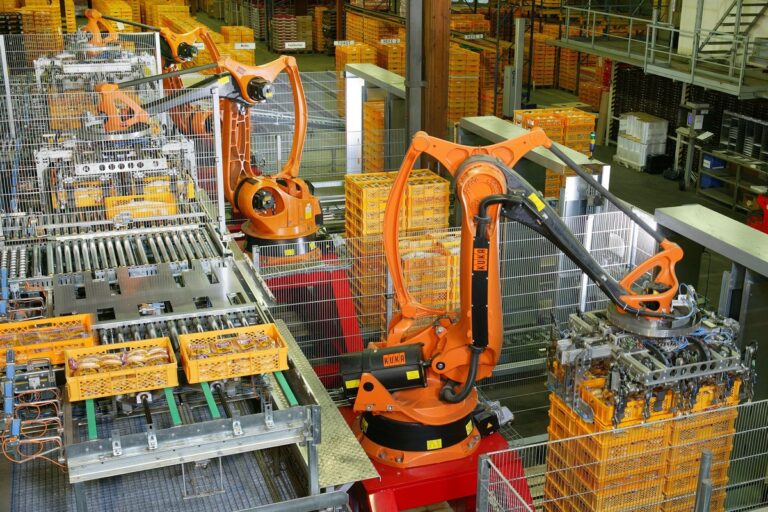
Robot arm selection connects mechanism, tooling and motion requirements with the output a complete automation cell must deliver. Photo: KUKA Roboter GmbH, Bachmann / Wikimedia Commons
Learn how to choose a robot arm by comparing architectures, payload, reach, accuracy and cycle time, then validate the complete application before deployment.
A robot arm moves a tool through a controlled sequence of positions and orientations. It may load a machine, place a component, weld a seam or stack cartons. Choosing one means matching its mechanical capabilities to the complete job, including the object, tooling, surrounding equipment and recovery procedure.
The most useful starting point is the required result: a good part delivered at the right rate. This guide builds on our automation guide and explains how to compare robot arm types, interpret specifications and test an application before committing to a cell.
Key Takeaways
Choose the arm architecture around the tool orientations, working volume and process demands, then verify the complete motion with the real equipment and load.
Payload includes attached tooling and the workpiece, while center of gravity, inertia and process forces determine whether the proposed motion stays within the manufacturer’s limits.
Acceptance testing should measure good completed cycles, positioning at the actual tool and recovery from representative faults rather than rely on a catalog speed or repeatability figure.
What a Robot Arm Actually Includes
The manipulator is the visible mechanical arm: links connected by driven joints. A controller coordinates those joints, while feedback devices report their state. Power equipment, software and the programming interface complete the core robot system.
The end effector performs the task. A gripper holds a component; a welding torch applies a process; a dispenser delivers material. A capable manipulator with an unsuitable tool will still produce an unreliable application. Our gripper guide covers that interface in detail.
A working cell also needs fixtures, part presentation, signals from adjacent machines and appropriate protective measures. Include these in the initial specification. Otherwise, a comparison of arms becomes a comparison of only one component of the required system.
The Main Robot Arm Types
Robot architecture describes how the joints are arranged. ABB’s robot overview distinguishes articulated, Cartesian, SCARA and delta configurations. Each arrangement gives a different combination of working volume, orientation capability and mechanical behavior.
Architecture
Typical strength
Question to verify
Articulated arm
Reorienting tools around equipment and parts
Can every approach and withdrawal fit without collisions or awkward joint positions?
SCARA
Repeated assembly and handling with largely vertical tool access
Does the process need tilting beyond the configuration’s available axes?
Cartesian or gantry
Linear motion over a defined rectangular working volume
Can the structure, travel and added tool axes support the complete job?
Delta
Rapid handling of suitable products within a bounded workspace
Do payload, orientation and product presentation fit the specific model?
A six-axis articulated arm commonly combines positioning joints with a wrist that changes tool orientation. That flexibility is useful for machine tending or approaching a component from several directions, but extra motion freedom can require more careful path planning.
A typical four-axis SCARA moves in the horizontal plane, raises or lowers the tool and rotates it around a vertical axis. It can suit a repetitive insertion or assembly task when the required approach is compatible with that arrangement. Epson offers both SCARA and six-axis machines in its industrial range; application fit matters more than treating either family as universally superior.
Cartesian systems use linear axes, sometimes with additional rotary tooling. Delta robots use parallel linkages and are often selected for fast picking. Neither name guarantees a particular payload or cycle time. Compare the proposed model and process, including conveyors, tracking and load transfer.
Degrees of Freedom and Useful Reach
A degree of freedom is an independent way the mechanism can move. The number of controlled axes helps describe the arm, but it does not directly state how many useful approaches it can achieve inside a crowded cell.
Reach is also more than a radius on a specification sheet. The tool needs to arrive at a target with the required orientation, then move through the process and leave without striking a fixture, machine door or cable. Some points inside the nominal envelope may be impractical for the task.
Build a layout with the robot base, workpiece, tool and obstacles. Check the entire trajectory, including intermediate poses. A tool that can reach the bottom of a machine may still lack clearance to rotate or withdraw a large part.
Allow for maintenance access and changeovers. Positioning every station at the edge of the arm’s available motion can make future product changes difficult. Conversely, a larger arm may occupy more floor space and create a wider moving envelope without improving the process.
Payload, Center of Gravity and Inertia
Payload is the load attached to the arm, not simply the product weight. Count the gripper, adapters, wrist-mounted equipment and carried workpiece. Account for the effects of service lines in the way the manufacturer specifies.
For an illustrative pick-and-place task, a 4 kg component, 2.5 kg gripper and 0.5 kg adapter produce a 7 kg attached mass. That arithmetic is only an initial check. It does not prove that any robot advertised for 7 kg can execute the proposed movement.
The distance between the load’s center of gravity and the tool flange changes the moments applied to the wrist. A long component can also have substantial rotational inertia. Universal Robots’ payload guidance explicitly relates capacity to center-of-gravity offset and discusses inertia and acceleration limits.
Check the manufacturer’s load diagrams and configuration procedure for the exact robot. Include empty and loaded tool states, changed tooling and process forces. Grinding, pressing or tightening can impose loads that are absent from a simple free-space handling demonstration.
Ask the supplier to evaluate the intended motion with documented load data. A slower acceleration or different tool layout may solve a constraint, but that change must be reflected in the cycle-time commitment.
Repeatability Is Different From Accuracy
Repeatability describes how consistently the robot returns to a pose under specified test conditions. Accuracy concerns how closely the achieved pose corresponds to the intended physical target. ABB’s technical review explains why those properties should be considered separately, alongside path accuracy.
A robot can repeatedly visit the same slightly wrong location. A taught pick point in a stable fixture may tolerate that situation differently from an offline program based on a CAD model. The latter depends more directly on the relationship between the model and the physical installation.
Tool calibration, base calibration, fixture variation and part tolerances all affect the result at the workpiece. Treat the positioning requirement as a complete error budget. A small catalog repeatability number cannot cancel a loose fixture or a shifting grasp.
Test what the process needs: placement error for assembly, path behavior for dispensing, or finished quality for machining. Record load, speed, temperature state and measurement method so the result can be reproduced.
Cycle Time: Count the Entire Operation
Advertised speed often describes a particular axis or reference movement. A production cycle also contains approach, gripping, confirmation, travel, settling, release and communication with other machines. The slowest dependent step can dominate throughput.
Suppose a station needs 180 good parts per hour. Its average allowance is 20 seconds per good part. A demonstrated 16-second cycle suggests 225 cycles per hour if uninterrupted. At an illustrative 90% operating availability and 98% good-output rate, that becomes about 198 good parts per scheduled hour.
The example is a planning calculation, not a forecast. Frequent replenishment, a longer product variant or shared downstream equipment could consume the apparent margin. Measure representative production rather than choose optimistic percentages to justify a purchase.
Separate robot cycle time from operator service time and total station output. Faster travel will not help if the cell spends most of its shift waiting for correctly presented parts.
Programming, Vision and Integration
Teaching positions is one part of programming. The application must also track operating state: whether a part is present, whether it is held, whether a machine is ready and whether the next action is permitted. Define these signals and their ownership before commissioning.
Vision can locate variable parts, but the camera-to-robot relationship must be calibrated and maintained. Decide how the system handles an uncertain detection or a missing item. Our vision guide explains why lighting and part presentation belong in that design.
Offline simulation is useful for layout and motion review. Validate tool dimensions, controller behavior and representative cycle timing against the actual cell. Our digital twins guide describes how to assess whether a model is trustworthy for a particular decision.
Document the production program, controller settings and backup process. Someone should be able to identify which version is running, restore an approved configuration and understand the consequences of a tooling change.
Cobots and Application Safety
A collaborative robot is still a moving machine. The tool, part, fixtures and intended human interaction determine the hazards of the completed application. A sharp component or trapping point does not become harmless because the arm belongs to a collaborative product family.
OSHA’s robot guidance treats the robot system and its integration as the relevant context for hazard assessment. Protective measures, access arrangements and procedures need validation for the actual installation.
Involve competent safety and integration specialists before finalizing the layout. Include setup, fault recovery, maintenance and unexpected restart, as well as routine production. Our cobot guide develops the distinction between collaborative features and a validated collaborative application.
Build an Acceptance Test Before Ordering
Specify the product range, required good-output rate, tool loads and quality measures. Include challenging but legitimate parts, planned changeovers and realistic upstream variation. Define how long the test runs and which interruptions count against performance.
Motion and quality: Verify all required poses, clearances and process results with the final tooling.
Production: Measure completed good cycles over a representative operating period, including replenishment.
Recovery: Test missing parts, failed grasps, machine-not-ready conditions and approved restart procedures.
Handover: Confirm backups, training, spare-part responsibilities and support arrangements.
Compare total installed and operating costs: arm, tooling, fixtures, guarding, controls, integration, service and internal engineering time. State what labor remains and whether the proposed output can actually be used by the next process.
A useful first robot arm project has a clear task, controlled variation and a measurable outcome. Select the mechanism that satisfies those requirements with an understandable operating margin, then prove that result at the workpiece.
Frequently Asked Questions
Which robot arm type is best for a beginner? Start with the task. A simple vertical pick-and-place process may suit a different mechanism from machine tending with several approach angles. Ease of programming does not replace checking reach, load and integration.
Does payload include the gripper? Yes. The attached load normally includes the tool, adapters, carried workpiece and other wrist-mounted equipment. Check center of gravity and inertia against the exact manufacturer’s limits.
Is a six-axis arm always better than a SCARA? No. Extra orientation freedom is useful when the task needs it, but a SCARA may suit a defined assembly or handling process. Compare the complete application’s output, space and cost.
Can repeatability predict assembly accuracy? Only partly. Tool and base calibration, fixture position, part variation and gripping stability also influence where the workpiece ends up. Test the assembled system against the actual tolerance.
Can a cobot operate without a fence? Some applications can use validated protective arrangements without a conventional perimeter fence. That decision requires assessment of the complete installation and applicable requirements; it cannot be made from the robot label alone.
What should a robot arm trial demonstrate? Representative good output, all required motions and quality, reliable handoffs and recovery from foreseeable faults. A short empty-tool movement shows much less than a complete production cycle.
Tesla confirms production-quality Optimus robots are leaving Fremont’s high-volume lines, but Musk says a 20,000-per-week pace remains at least a year away.